I had a multi-agent system that could handle complex store operations. It worked — when I was there to prompt it. Every morning I’d open a terminal, type the task, review the output, feed corrections back in, and repeat until the result was good enough. I was the loop.
Then I went on vacation. The system sat idle for a week because nobody knew the right prompts to type. The tools worked. The agents worked. The missing piece was me, sitting in a chair, deciding what to run next and whether the output was done.
That’s when it clicked: the bottleneck wasn’t the model. It wasn’t the prompt. It wasn’t even the tools. The bottleneck was the human in the loop — and the solution was to engineer the loop itself.
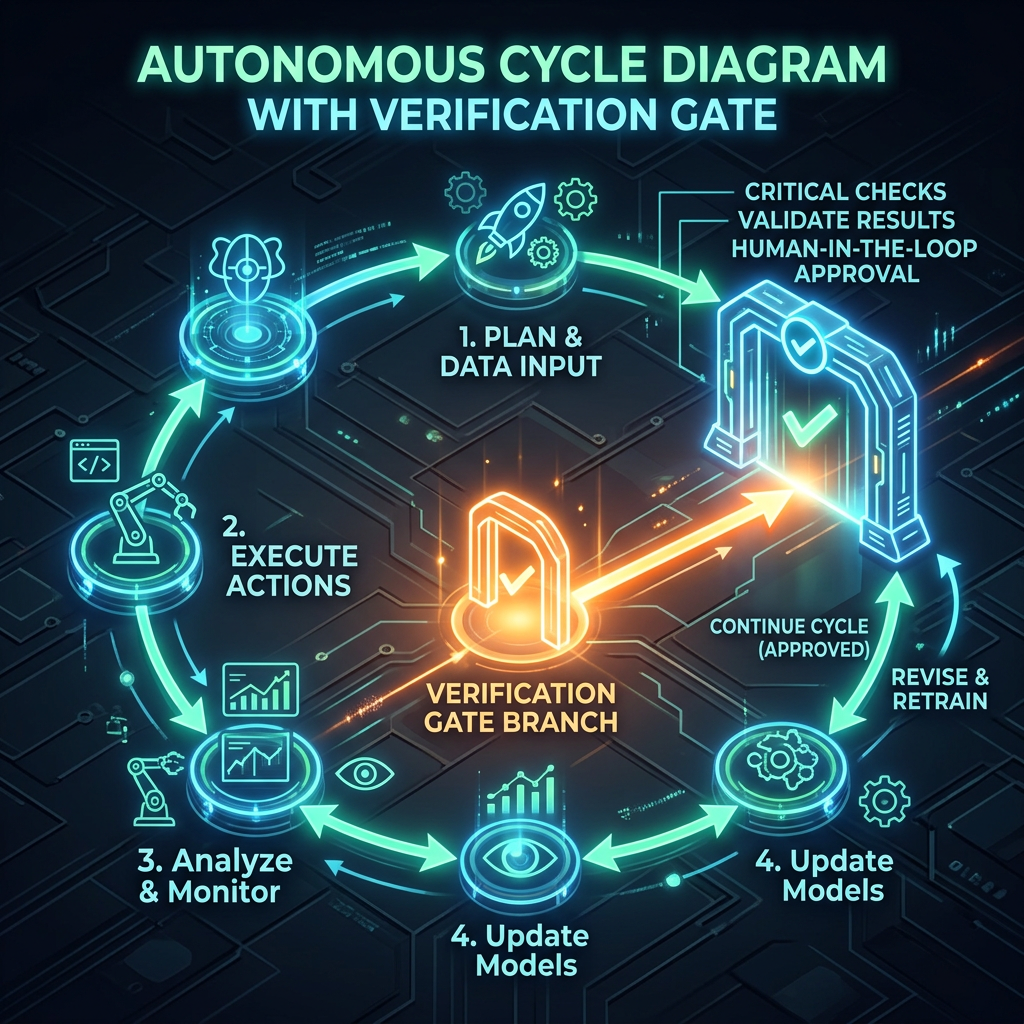
Loop engineering is designing the system that prompts the agent for you: the trigger that starts it, the verifier that checks its work, and the stop condition that decides when it’s done. You define a goal. The loop does the iterating.
Related: This builds on What Is an AI Agent? and Building Multi-Agent AI Systems. You’ll want to understand single-agent and multi-agent patterns before going autonomous.
The Evolution: How We Got Here
Loop engineering didn’t appear from nowhere. It’s the latest layer in a four-step progression, and each layer only became visible once the one below it stopped being the bottleneck.
| Layer | Era | You Control | Bottleneck It Solved |
|---|---|---|---|
| Prompt Engineering | 2022–2024 | The words you send | Getting the model to understand you |
| Context Engineering | 2025 | Everything the model sees | Giving the model the right information |
| Harness Engineering | Early 2026 | The environment around the model | Tools, guardrails, error recovery |
| Loop Engineering | Mid 2026 | The autonomous cycle that drives the agent | Removing the human from the iteration loop |
Prompt engineering was about wording a single instruction well. Context engineering — popularized by Andrej Karpathy in 2025 — was about curating what the model sees across its context window: RAG, memory, retrieval. Harness engineering was about the operational wrapper: sandboxing, schema validation, tool execution, error handling. Each layer wraps the previous one.
Loop engineering is the outermost layer. As Boris Cherny, creator of Claude Code, put it: “I don’t prompt Claude anymore. I have loops running that prompt Claude and figuring out what to do. My job is to write loops.”
That sentence reframed how I think about agent development. The prompt is still important — but it’s now one input to a much larger system.
The Ralph Technique: Where It Started
Before loop engineering had a name, there was Ralph.
In mid-2025, Geoffrey Huntley described running a coding agent inside a plain bash while loop. He named it after Ralph Wiggum from The Simpsons — “deterministically simple in an unpredictable world.” Here’s the core idea:
while true; do claude -p "Read SPEC.md and progress.txt. Pick the next uncompleted task. \ Implement it. Run the tests. If they pass, mark the task as done in \ progress.txt and commit. Then exit." # Check if all tasks are done if grep -q "ALL_TASKS_COMPLETE" progress.txt; then echo "Done." break fidone
That’s it. Feed the agent the same prompt against a written spec. Let it pick one task and implement it. Start a fresh instance and feed the identical prompt again. Repeat until the work is done.
The non-obvious insight is the context reset. A long agent session degrades as the context window fills with old reasoning, dead ends, and stale file contents. Ralph sidesteps that entirely: every iteration is a new agent with a clean context that reads the current state of the repo from disk, does exactly one unit of work, commits it, and exits.
The intelligence doesn’t come from the model’s multi-turn memory. It comes from clear specifications and verifiable outcomes — plus a state file on disk that persists across iterations.
Huntley reportedly built an entire programming language with this technique for about $297. The pattern was simple enough that it felt almost too dumb to work. But it worked precisely because it was dumb — there was no accumulated confusion, no degraded context, no agent forgetting what it had already done.
Anatomy of an Engineered Loop
Every production loop has four components. Miss one and the loop either never finishes or never stops.
1. The Trigger
What starts the loop. Could be a schedule (“every morning at 9”), an event (“a PR was merged”), or a command (“run until this goal is met”).
2. The Task Prompt
What the agent should do on each iteration. This is where prompt engineering still matters — but it’s now a template, not a one-off. The same prompt runs every cycle, grounded by the current state.
3. The Verifier
The check that decides whether the work is actually done. This is the most important component. A task without a verifier is just hope.
The golden rule: never let the AI verify its own “done.” The model that did the work should not be the model that judges the work. Use a separate model, a test suite, a linter, or a deterministic check.
4. The Stop Condition
The exit rule. When the verifier says the goal is met — or when a safety limit is hit (max iterations, max tokens, max time). Without this, you get a runaway agent burning tokens at 3am.
Here’s what this looks like as a complete loop:
import subprocessimport jsonMAX_ITERATIONS = 20SPEC_FILE = "SPEC.md"PROGRESS_FILE = "progress.txt"def run_agent_iteration(task_prompt: str) -> str: """Run a single agent iteration with a fresh context.""" result = subprocess.run( ["claude", "-p", task_prompt, "--output-format", "json"], capture_output=True, text=True, timeout=120 ) return result.stdoutdef verify_completion() -> bool: """Check if all tasks in the spec are marked complete.""" with open(PROGRESS_FILE, "r") as f: progress = f.read() return "ALL_TASKS_COMPLETE" in progressdef run_tests() -> bool: """Run the test suite as a hard verification gate.""" result = subprocess.run(["pytest", "--tb=short"], capture_output=True) return result.returncode == 0# The looptask_prompt = f"""Read {SPEC_FILE} for the full specification.Read {PROGRESS_FILE} for what's already done.Pick the next uncompleted task.Implement it. Run the tests. If they pass, update {PROGRESS_FILE} and commit.If tests fail, fix the issue before committing.Then exit."""for iteration in range(MAX_ITERATIONS): print(f"--- Iteration {iteration + 1}/{MAX_ITERATIONS} ---") run_agent_iteration(task_prompt) if not run_tests(): print("Tests failing. Agent will retry on next iteration.") continue if verify_completion(): print(f"All tasks complete after {iteration + 1} iterations.") breakelse: print(f"Hit iteration limit ({MAX_ITERATIONS}). Check progress manually.")
Four components: the for loop is the trigger, the task_prompt is the task, run_tests() is the verifier, and verify_completion() plus MAX_ITERATIONS is the stop condition.
Loop Patterns: Five Ways to Structure the Cycle
Not every loop is a simple while loop. After building several autonomous workflows, I’ve found five distinct patterns — each suited to different kinds of tasks.
Pattern 1: The Simple Iteration Loop
One agent, one task, fresh context each cycle. This is the Ralph pattern.
┌─────────────────────────────┐│ Read spec + state from disk││ Pick next task ││ Implement it ││ Run tests ││ Update state file ││ Exit │└──────────────┬──────────────┘ │ All done? ── No ──→ New agent, same prompt │ Yes │ Stop
Best for: Code generation from specs, batch processing, any task where progress can be tracked in a file.
Pattern 2: The Evaluator-Optimizer Loop
Two models in a loop. One generates, one grades. The loop repeats until the grader is satisfied.
MAX_ROUNDS = 5draft = generate_with_agent(task)for round in range(MAX_ROUNDS): # Separate model evaluates the draft evaluation = evaluate_with_reviewer(draft, criteria) if evaluation["score"] >= 0.9: break # Feed the evaluation back to the generator draft = generate_with_agent( f"Previous attempt:\n{draft}\n\nFeedback:\n{evaluation['feedback']}\n\nRevise." )
Best for: Content generation, code review, anything where quality is subjective and benefits from iterative refinement.
Pattern 3: The Plan-Execute-Verify Loop
The agent makes a plan first, then executes steps one at a time, verifying each step before moving to the next.
# Phase 1: Planplan = run_agent("Read SPEC.md. Create a numbered implementation plan. Save to plan.md.")# Phase 2: Execute each stepsteps = parse_plan("plan.md")for i, step in enumerate(steps): run_agent(f"Execute step {i+1} from plan.md: {step}. Run tests after.") if not run_tests(): # Step failed — agent gets one retry with error context test_output = get_test_output() run_agent(f"Step {i+1} failed. Error:\n{test_output}\nFix and retry.") if not run_tests(): raise Exception(f"Step {i+1} failed after retry. Manual intervention needed.")
Best for: Complex multi-step implementations where the order matters and each step should be verified independently.
Pattern 4: The Inner/Outer Loop
When the inner loop stalls, the outer loop resets the entire strategy. This prevents the “insistent failure” pattern where an agent hammers the same broken approach.
MAX_OUTER = 3 # Strategy resetsMAX_INNER = 10 # Steps per strategyfor outer in range(MAX_OUTER): # Outer loop: generate a fresh strategy strategy = run_agent( f"Read SPEC.md and progress.txt. Previous strategies failed " f"{outer} times. Devise a NEW approach. Save to strategy.md." ) for inner in range(MAX_INNER): run_agent("Execute the next step from strategy.md. Update progress.txt.") if verify_completion(): print("Done.") break if detect_no_progress(last_n=3): print("Inner loop stalled. Resetting strategy.") break # Break inner, try new strategy in outer else: continue break
Best for: Hard problems where the first approach might not work. Research tasks, complex debugging, migration projects.
Pattern 5: The Supervisor Loop
A supervisor agent coordinates multiple worker agents, each running their own sub-loop. The supervisor checks overall progress and reassigns work when agents stall.
┌───────────────────────┐│ SUPERVISOR ││ Reads master spec ││ Assigns tasks ││ Checks progress │└───┬──────┬──────┬─────┘ │ │ │ ▼ ▼ ▼ Worker Worker Worker Loop A Loop B Loop C (Auth) (API) (Tests) │ │ │ └──────┴──────┘ │ Supervisor checks: All workers done? Any worker stuck? Reassign if needed.
Best for: Large projects that can be parallelized. Multiple features being built simultaneously. The supervisor adds overhead, so only use this when parallel execution saves real time.
The Verifier Is the Whole Game
I’ll say it again because it’s the single most important lesson: the verifier is the whole game.
A loop without a verifier is an agent running in circles. A loop with a weak verifier (like asking the same model “are you done?”) is an agent that declares victory after two steps.
Here’s my hierarchy of verifier strength, from weakest to strongest:
| Verifier Type | Strength | Example |
|---|---|---|
| Self-assessment | Weak | “Agent, are you done?” — agent says yes |
| Separate model | Medium | Haiku reads the transcript and evaluates |
| Deterministic check | Strong | pytest returns exit code 0 |
| External validation | Strongest | CI pipeline passes, linter clean, type-checker passes |
In practice, I combine them. The deterministic checks (tests, linting, type-checking) are the gate. The separate model assessment is a secondary check for tasks where “correct” isn’t binary — like whether generated documentation actually covers all the endpoints.
def verify(task_type: str) -> bool: """Multi-layer verification.""" # Layer 1: Hard gate — tests must pass if not run_tests(): return False # Layer 2: Hard gate — type checker must pass if not run_type_check(): return False # Layer 3: Soft gate — separate model reviews quality if task_type == "documentation": review = run_reviewer_agent( "Read docs/ and src/. Does the documentation cover all public APIs? " "Return JSON: {\"complete\": true/false, \"missing\": [...]}" ) return review["complete"] return True
What Didn’t Work: Three Expensive Lessons
The Agent That Ran All Night
My first loop had no iteration cap. I set it running before bed — “implement all features in SPEC.md.” I woke up to a $47 API bill and an agent that had been arguing with a failing test for 6 hours. The test was flawed, not the code. The agent couldn’t tell the difference.
Fix: Always set three hard limits: max iterations, max tokens, and max wall-clock time. My defaults: 20 iterations, 200K tokens, 30 minutes. The agent must return its best partial result when it hits any limit.
The Context Amnesia Problem
I tried running a single long-lived agent session instead of fresh instances. By iteration 8, the context window was so polluted with old tool results and dead-end reasoning that the agent started repeating work it had already done. It re-implemented a function it had written three iterations ago because the earlier implementation had scrolled out of its effective attention.
Fix: The Ralph pattern exists for a reason. Fresh context per iteration, state persisted to disk. The agent reads the current state from files, not from its own memory of what it did five turns ago.
The Optimistic Verifier
I used the same model to both generate code and verify it. The agent would write a function, then “verify” it by reading its own code and concluding it looked correct. It hallucinated passing tests. The code had a subtle off-by-one error that a real test suite would have caught instantly.
Fix: Never let the agent grade its own homework. Run real tests. Use a separate model for evaluation. Or better yet, use both: real tests for correctness, separate model for completeness.
Loop Engineering in Practice: Claude Code
Claude Code shipped native loop engineering primitives starting in early 2026. If you’re using Claude Code, you don’t need a bash script — the tooling is built in.
/goal — Run Until a Condition Is Met
/goal All tests pass and coverage is above 80%
Under the hood, /goal is a wrapper around a Stop hook. Each time Claude finishes a turn, the goal condition and the conversation transcript are sent to a separate small model (Haiku by default). That model returns a yes/no decision. A “no” tells Claude to keep working and includes the reason as guidance for the next turn.
The key design: Claude in the main session is not judging its own work. The verifier is a separate model reading the transcript independently.
/loop — Recurring Iteration
/loop Read test.md, find the next unchecked line, implement it, mark it done. Stop when all lines have checkmarks.
The loop has a built-in natural end: the file defines “done.” It doesn’t run for N turns because you said so. It runs until the task is finished.
Stop Hooks — Custom Verification Gates
For checks that can’t be proven from the transcript alone, you write a Stop hook — a script that fires every time Claude tries to stop:
{ "hooks": { "Stop": [ { "type": "command", "command": "pytest --tb=short && npx tsc --noEmit", "timeout": 30000 } ] }}
If the hook returns a non-zero exit code, Claude doesn’t stop. It sees the error output and keeps working. This is the verification gate that makes loops reliable in practice.
When to Use Loop Engineering (and When Not To)
Loop engineering pays off when work is repetitive, long-running, or benefits from running unattended — and when you can define a goal with a checkable success condition.
Use loop engineering when:
- The task has a verifiable end state (tests pass, file complete, coverage met)
- The work is decomposable into independent units
- You want the system to run unattended
- The cost of human iteration time exceeds the cost of agent iterations
Don’t use loop engineering when:
- The goal is subjective and hard to verify (“make the code better”)
- The task requires human judgment at each step
- The cost of a wrong answer is very high and verification is unreliable
- A single prompt or a short agent session already solves it
My rule: if you can’t write the verifier, you can’t write the loop. The verifier comes first. If you find yourself thinking “the agent will know when it’s done” — that’s not loop engineering. That’s hope.
Final Thoughts: A Task Without a Check Is Just Hope
The shift from prompt engineering to loop engineering mirrors how software engineering itself matured. We went from writing code in a text editor and eyeballing the output, to CI pipelines with automated tests, linting, and deployment gates. Loop engineering is the same progression for AI: stop checking the work manually and build the system that checks it for you.
The three principles I keep coming back to:
- Fresh context beats long memory. Reset per iteration. Persist state to disk. Let the agent read the current world, not its memory of three turns ago.
- The verifier is the product. Anyone can write a while loop. The hard part — and the part that makes loops trustworthy — is the verification gate that the agent can’t fake.
- Cap everything. Iterations, tokens, wall-clock time. An uncapped loop is a credit card attached to an optimistic algorithm.
The prompt matters. The context matters. The harness matters. But the loop is what lets you close the laptop and walk away. And walking away is the whole point.
Previously: Building Multi-Agent AI Systems. See also: Prompt Engineering Techniques and Function Calling Explained.
Leave a Reply