In today’s fast-paced DevOps environments, integrating with external services like Atlassian, Figma, and GitHub is essential for productivity and automation. However, these integrations often raise concerns about data privacy, access control, and compliance. Local Model Context Protocol (MCP) servers offer a robust solution, enabling secure, auditable, and efficient automation while keeping sensitive data within your organization’s boundaries.
What Are Local MCP Servers?
Local MCP servers are containerized or script-based services that run on your own infrastructure—typically via Docker or local scripts. They act as secure intermediaries between your development tools (such as GitHub Copilot) and external APIs, handling requests and responses without exposing your data to the public internet.
Key Security Benefits
1. Data Privacy and Isolation
Local Execution: All data processing happens on your machine or within your network. Sensitive information never leaves your controlled environment.
Limited Scope: Access is restricted to internal organizational data. There’s no risk of accidental exposure to public services or third parties.
2. Access Control
Principle of Least Privilege: API tokens used by MCP servers are configured with only the permissions required for specific tasks. This minimizes the impact of a compromised token.
Administrative Oversight: Token issuance, expiration, and revocation are managed by your administrators, ensuring tight control over who can access what and for how long.
3. Traceability and Auditing
Comprehensive Logging: All API calls made through MCP servers are logged by the respective platforms (Atlassian, Figma, GitHub). This creates a clear audit trail for compliance and security reviews.
Local Visibility: Since execution is local, you can monitor, review, and analyze all activity without relying on third-party logs.
The Secure Workflow in Action
Here’s how a typical secure workflow unfolds when using local MCP servers:
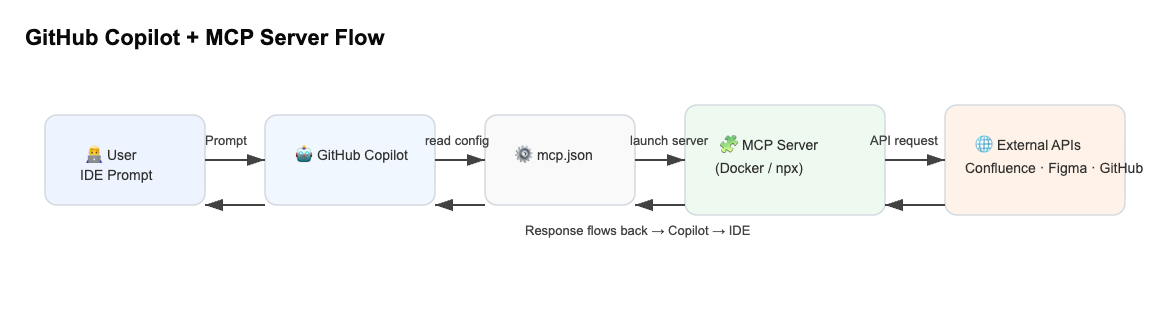
User Request: A developer asks their IDE (e.g., via GitHub Copilot) to perform an action involving an external service.
Configuration Lookup: The tool consults a local configuration file (like
mcp.json) to determine how to connect securely.Local Server Execution: The MCP server is launched locally, using secure environment variables for credentials.
API Call: The local server makes a direct, authenticated call to the external API.
Response Handling: Data is returned to the local server, then forwarded to the requesting tool.
Result Display: The developer receives the result in their IDE, with all sensitive data remaining within the local environment.
Why This Matters for Modern DevOps
Reduced Attack Surface: By keeping all sensitive operations local, you dramatically reduce the risk of data breaches and leaks.
Compliance Made Easy: Local execution and detailed logging simplify compliance with regulations like GDPR and SOC 2.
Faster Incident Response: With full control and visibility, your team can quickly detect, investigate, and remediate any suspicious activity.
Conclusion
Local MCP servers represent a best-practice approach for secure, efficient, and compliant DevOps automation. By combining local execution, strict access control, and comprehensive auditing, they empower organizations to innovate confidently—without sacrificing security.
Interested in more DevOps security insights? Subscribe for future articles on automation, compliance, and best practices!
 Byte Mind - AI for Builders
Leave a comment